

Configuration
PosterPilot is configured two ways, and they work together:
- Environment variables — set on the container. Good for unattended setups and secret management.
- The in-app Settings page — entered in the UI and persisted to the SQLite
database under
/dataso they survive restarts. Settings is organized into Servers, Metadata & providers, Kometa & advanced, Diagnostics, Backup & restore, Automation, Security, Language, and Activity. Managing Kometa’s ownconfig.ymllives on its own Kometa manager page (the Kometa item in the main nav), not in Settings. A guided first-install wizard at/setupcovers the same ground in order for a fresh install.
Environment vs. the Settings UI
Section titled “Environment vs. the Settings UI”For any given setting, the environment variable always takes precedence over the persisted UI value. When a value is supplied via the environment, the Settings page shows it as environment-managed and locks it from editing in the UI — so the source of truth is unambiguous.
If a value is set in neither place, the documented default (if any) applies, or the feature that depends on it stays unconfigured until you set it.
Secrets (the Plex token, the Jellyfin/Emby API keys, the TMDB credential, the Fanart.tv key, and the ThePosterDB account password) are never echoed back to the browser after they are saved and are redacted from logs — the Settings page only indicates that a secret is set.
Secrets and encryption
Section titled “Secrets and encryption”Those same secrets — the Plex token, the Jellyfin and Emby API keys / access
tokens, the TMDB credential, the Fanart.tv key, and the ThePosterDB account
password — are encrypted at rest with
AES-256-GCM before they are written to the SQLite database. Each stored value is
self-describing (it carries an enc:v1: prefix), so PosterPilot can tell encrypted
values from legacy plaintext.
- Zero setup by default. On first run PosterPilot generates a random 32-byte
instance key and persists it — owner-readable only — at
data/.app-key. Nothing to configure: secrets are encrypted automatically. (Override the path withAPP_KEY_FILEif you need to.) - Portable key for shared deployments. Set the optional
APP_SECRETenvironment variable to derive the key from a value you control (deterministically via scrypt). Use it when you run multiple replicas sharing one database, or when you want the same key to survive recreating the container without carrying the key file across. WhenAPP_SECRETis set it takes precedence over the generateddata/.app-key. - Existing installs are not broken. Secrets saved by an older version as plaintext are read transparently and re-encrypted the next time that setting is saved — no manual re-entry needed.
- Safe failure. If a secret cannot be decrypted (for example the key was lost or changed), PosterPilot treats it as unset and prompts you to re-enter it rather than crashing.
Authentication
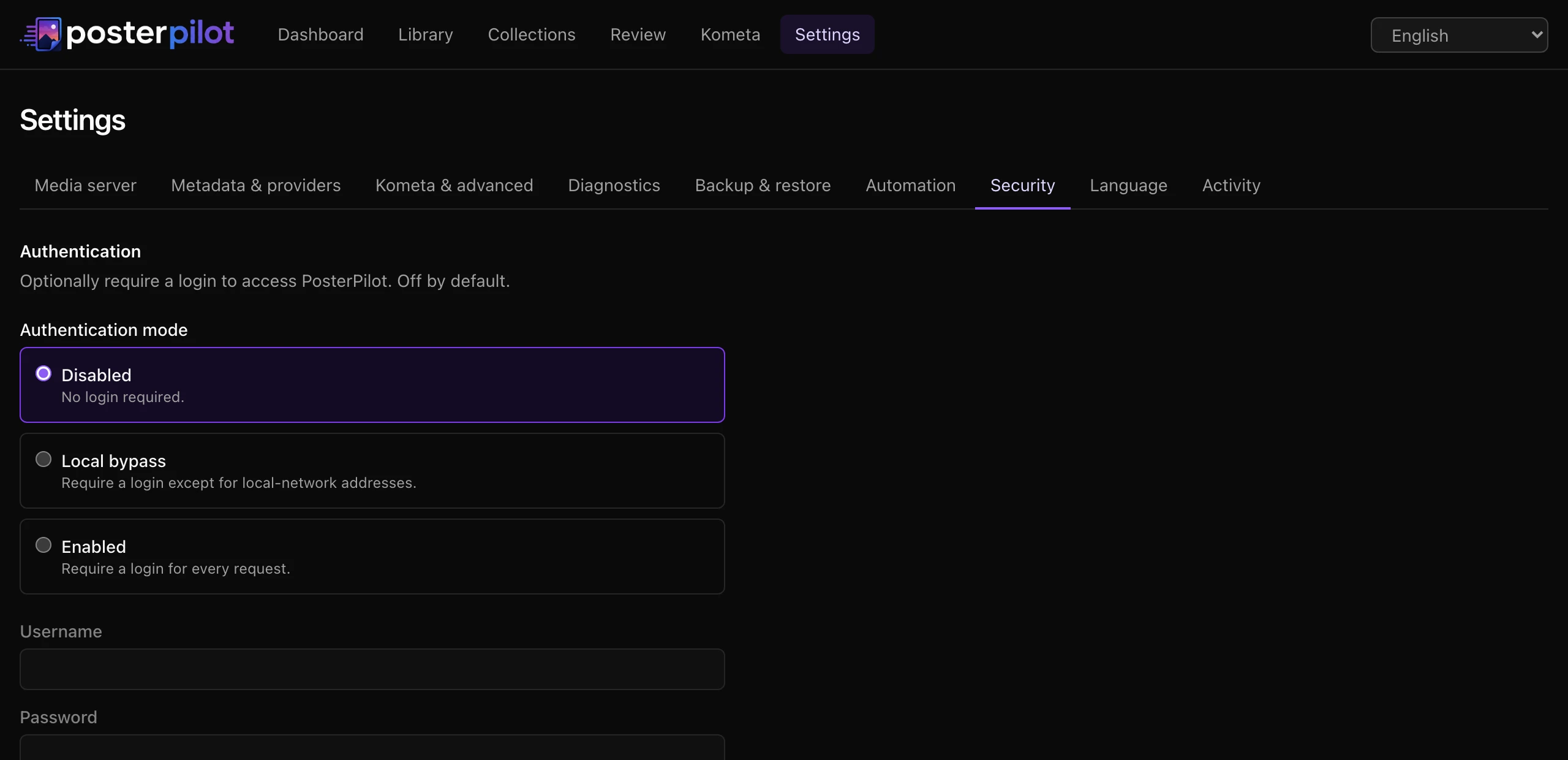
Section titled “Authentication”PosterPilot ships with no login by default — on a trusted LAN it stays out of
your way. When you expose it, you can require a login, *arr-style (Sonarr/Radarr),
with an optional local-network bypass. Configure it in Settings → Security, or
lock the mode from the environment with AUTH_MODE.
Three modes:
disabled(default) — no login; every route is open.local— a login is required except for local-network addresses (loopback, RFC1918, link-local, IPv6 ULA). LAN clients are never prompted; everyone else must log in. Local addresses always bypass — there is no logout for LAN access in this mode.enabled— a login is required for every request.
Set a username and password in the Security tab. The password is stored only as a
salted scrypt hash (never plaintext, never recoverable), separate from the
secrets-encryption key, so it never depends on .app-key. The session is a signed,
HttpOnly cookie with a sliding 14-day expiry; changing the password invalidates
all existing sessions.
Behind a reverse proxy
Section titled “Behind a reverse proxy”local mode is fail-closed: if a request carries an X-Forwarded-For /
Forwarded header but you have not told PosterPilot which header to trust, it is
treated as non-local and must log in. Otherwise a proxy — whose socket IP is
usually private — would make all internet traffic look local. Configure adapter-node’s
built-ins so the real client IP is used:
ADDRESS_HEADER=x-forwarded-forXFF_DEPTH=<number of trusted proxies in front of the app>
A direct LAN client never sends a forwarded header, so it always bypasses correctly.
Anti-lockout
Section titled “Anti-lockout”AUTH_MODE in the environment overrides the persisted mode and locks the control
in the UI. Set AUTH_MODE=disabled to recover an instance you have locked yourself
out of. As a further safety net, if the mode is enabled/local but no credentials
are stored, PosterPilot falls back to disabled rather than lock everyone out.
Named media servers
Section titled “Named media servers”PosterPilot can store multiple named Plex, Jellyfin, and Emby instances. One enabled instance is active at a time for Library, Review, Collections, FUN, jobs, and mutations. Add and test instances in Settings → Servers; with two or more enabled instances, the app shell also shows a switcher.
SERVER_TYPE plus PLEX_*, JELLYFIN_*, or EMBY_* remain the environment form
of the protected legacy/default instance. On upgrade, existing single-server data is
assigned to that named instance in place. Additional servers are stored separately
with encrypted credentials; the legacy variables do not define a list of servers.
See Multi-server migration.
Every server reports its own capabilities. Preview disables or skips unsupported poster, background, season, episode, read, lock, or delete operations instead of assuming that every Plex/Jellyfin/Emby version behaves identically.
Plex needs a base URL and an X-Plex-Token. You can supply them three ways:
- PIN login (recommended). In Settings, start a Plex login. PosterPilot creates a strong PIN with plex.tv, shows you a code and an authorization link, and polls until you authorize it — then it stores the acquired token for you, so you never have to find and paste a raw token. If the PIN expires before you authorize, just start a new login.
- Connection discovery. Once a token is available, PosterPilot can discover your Plex servers and their connections from plex.tv, labelling each connection local or remote (relays are flagged). Pick one instead of typing a URL; the chosen connection is verified with a connection test before it is saved as the active Plex base URL.
- Manual. Paste the base URL (e.g.
http://192.168.1.10:32400) and anX-Plex-Tokendirectly.
Jellyfin
Section titled “Jellyfin”Jellyfin needs a base URL (JELLYFIN_URL) and an access token, stored as the API
key (JELLYFIN_API_KEY). Set SERVER_TYPE=jellyfin to make it the active server.
The simplest way to connect is to sign in with your Jellyfin username and
password in Settings — PosterPilot authenticates against the server and stores
the returned access token for you (encrypted at rest), so you never have to
generate an API key by hand; the password is used only for that one request and is
never persisted. Pasting an API key directly stays available as a fallback.
Posters and backgrounds are uploaded to the Jellyfin image API (Primary for
poster, Backdrop for background). There is no PIN login or connection discovery
as there is for Plex.
Emby needs a base URL (EMBY_URL) and an access token, stored as the API key
(EMBY_API_KEY). Set SERVER_TYPE=emby to make it the active server. Like
Jellyfin, Emby lets you sign in with your username and password — PosterPilot
exchanges them for an access token and stores it (encrypted) so you do not have to
find an API key, with manual API-key entry as a fallback. There is no PIN login or
connection discovery.
TMDB key
Section titled “TMDB key”A TMDB API credential is required: PosterPilot
resolves each synced title to a TMDB id (so providers can be queried accurately)
and TMDB is also one of the artwork providers. Set it via TMDB_KEY or in
Settings. Both a v3 API key and a v4 bearer/JWT token are accepted — the
format is auto-detected.
Artwork providers
Section titled “Artwork providers”PosterPilot fans out across multiple artwork providers during discovery and merges their candidates, tagging each with the provider it came from. Each provider can be enabled or disabled independently, in Settings or via its environment variable.
| Provider | Default | Needs a key | Notes |
|---|---|---|---|
| MediUX | on | no | Scraped poster/background sets with uploader attribution. |
| TMDB | on | reuses TMDB_KEY |
Posters and backdrops from the TMDB images endpoint. |
| Fanart.tv | off | FANART_KEY |
Posters, backgrounds, and logos from the Fanart.tv API. |
| ThePosterDB | off | no | Scraped community poster/background sets, throttled and cached. Optional account sign-in (below). |
Fanart.tv is the only keyed provider: if it is enabled but no FANART_KEY is
configured, discovery skips it and surfaces the missing-credential condition
rather than failing the whole run. A failure, timeout, or unparseable response
from one provider never prevents the others from returning candidates.
Provider order
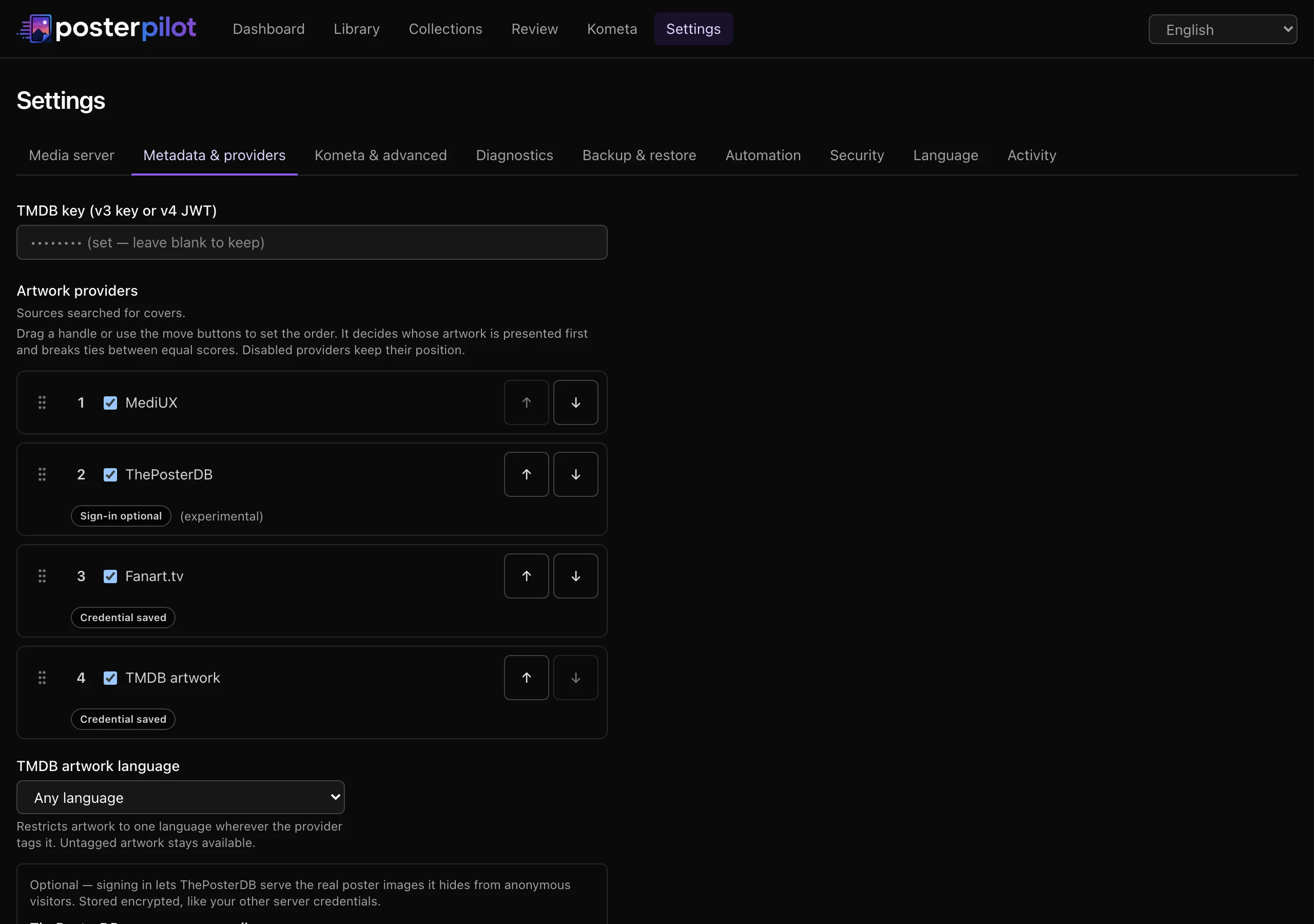
Section titled “Provider order”Settings → Metadata & providers also lets you reorder the four providers, by dragging a handle or using the move buttons; Reset to default order restores MediUX, ThePosterDB, Fanart.tv, TMDB. Like the scoring weights, the order lives in the database and has no environment variable.
The control exists because discovery runs every provider in parallel and each commits its own results, so the order candidates ended up stored in records nothing except which provider answered first. Presenting that accident of timing as a ranking would be misleading, so the item view follows your configured order instead.
What the order does — and, just as importantly, what it does not:
- It decides which provider’s card the item page shows first. Presentation only; the candidates inside a card keep their own order.
- It breaks a tie between candidates whose scores are exactly equal, applied strictly after the numeric score.
- It never overturns an unequal score. A sharper or better-shaped image from a provider you placed last still wins the suggestion — provider is a tie-breaker, not an override. To change which provider usually wins, adjust the per-provider scoring weights (see Performance and tuning).
- A disabled provider keeps its position, so re-enabling it does not send it to the bottom. A provider your saved order does not mention — a newly added source, or a row left by a removed one — is shown last rather than reshuffling everything around it.
ThePosterDB account (optional)
Section titled “ThePosterDB account (optional)”ThePosterDB works without an account — anonymous scraping stays the default and no credentials are ever required. The catch is on their side: ThePosterDB serves a placeholder image instead of the real artwork to anonymous visitors on some pages, so anonymous discovery can come back with covers that are not the actual poster. Signing in with a (free) ThePosterDB account lets PosterPilot fetch the real assets.
Enter the credentials in Settings → Metadata & providers — the username and
password fields appear once ThePosterDB is enabled — or set
THEPOSTERDB_USERNAME / THEPOSTERDB_PASSWORD. The password is a secret like
the others: AES-256-GCM encrypted at rest and never echoed back to the browser
(leave the password field blank to keep the stored value). To return to
anonymous scraping, clear the username — sign-in needs both, so discovery
goes anonymous as soon as the username is gone. Clearing the username keeps the
stored password — still encrypted, reused if you re-enter the username — so to
delete the secret itself, use the Clear stored password control under the
password field: the encrypted value is deleted when you save, and discovery is
back to having no credentials at all. A failed sign-in —
wrong password, site unreachable — falls back to anonymous scraping for that run
instead of failing discovery.
The session is cached in memory and renewed automatically when it expires, and
changed credentials take effect on the next discovery without a restart.
TMDB artwork language
Section titled “TMDB artwork language”TMDB tags most posters and backdrops with the language of the text printed on
them. TMDB_ARTWORK_LANGUAGE (or Settings → Metadata & providers) decides
which of those you browse and which ones an automatic suggestion may pick. It is
deliberately independent of APP_LANGUAGE — a Portuguese interface with
English posters is a perfectly reasonable combination, and so is the reverse.
Three shapes of value are accepted:
any(default) — browse and auto-select across every language TMDB returned. This is exactly the behavior that predates the setting, so upgrading changes nothing until you opt in.ui— follow the application’s UI language, normalized to its base code: apt-BRinterface preferspt-tagged artwork. If no UI locale can be resolved — an unattended job on an install that has never persisted one — it degrades toanyrather than inventing a language.- An explicit ISO 639-1 base code —
en,de,it, … These are not limited to the six translated UI locales: TMDB tags artwork in far more languages than PosterPilot is translated into. The Settings dropdown offers a curated ten (German, English, Spanish, French, Italian, Japanese, Korean, Portuguese, Russian, Chinese); a code set through the environment that is not on that list is added to the dropdown rather than dropped, so saving Settings can never silently rewrite it.
A value that is none of those is treated as unset and falls back to any rather
than applying a broken filter — a typo never empties your candidate grid. Like
every other environment-backed setting, TMDB_ARTWORK_LANGUAGE overrides the
persisted value and the Settings field shows as environment-managed.
Four behaviors are worth knowing before you set it:
- It governs TMDB and nothing else. Every other provider’s artwork stays eligible under every preference. That is the rule, not a shortcut. MediUX and ThePosterDB never report a language at all, so treating “no language” as ineligible would empty their grids the moment any preference was set, and a fresh search could never bring them back because it would report no language again. Fanart.tv does tag languages — it is still left alone, because filtering it would quietly discard a higher-scoring asset on a signal this setting was never meant to govern.
- Textless artwork always stays. Artwork that TMDB explicitly marks as carrying no language counts as language-neutral and remains available under every preference, so a preference can never empty a pane that only holds neutral art.
- Discovery keeps everything. The preference controls browsing and automatic selection, not what gets downloaded — every language TMDB returned is stored. Changing it re-filters what you already have and never requires a re-search.
- Automatic selection stays honest. A suggestion falls back to a foreign-language poster only when no preferred or untagged option exists, and labels it when it does. A staged fallback stays visible on the page rather than being filtered away by the preference that produced it — a choice you have to be able to see is a choice you have to be able to revoke.
There is one case the app cannot answer on its own. TMDB candidates discovered before PosterPilot recorded how it learned a language are marked Unverified: a blank language field there means “we never recorded this”, not “TMDB said it is textless”. Those candidates are kept rather than hidden — demoting a library’s entire pre-upgrade TMDB inventory the moment a preference is set would be worse — and the provider group offers a re-search so a fresh run can record the real tags.
Item pages carry a Show all languages toggle (and Show only language to go back), so you can look past the preference for one title without changing the global setting. When the preference matches nothing for a title, the page says how many covers exist in other languages and offers the same escape hatch instead of showing an empty grid.
Candidate inventory and load more
Section titled “Candidate inventory and load more”TMDB ingestion used to stop at 20 images per artwork kind — posters and backdrops counted separately, which is where the “capped at 40 covers” reports came from. Discovery now retains far more than that — validated, then deduplicated on TMDB’s own file identity, then bounded, strictly in that order, so a malformed entry no longer silently costs a candidate — and keeps the order TMDB ranked them in.
The item page then shows each pane in batches of 24 tiles, with a load more control that names how many are still hidden. 24 divides evenly into every grid the page renders (two columns for backdrops, four for title cards, eight for season posters), so a reveal never leaves a ragged half-row. Every pane discloses independently — provider by provider, set by set, poster separately from backdrop, and each season’s posters separately from its title cards — so expanding one never expands another. Revealing more costs no network traffic: the retained inventory already ships with the page, so this bounds render cost, not bandwidth.
Ingestion still applies a defensive ceiling of 200 candidates per artwork kind, so one pathological title cannot pull in an unbounded number of images. That is a storage and render bound, not a quality filter — and reaching it is reported rather than passed over in silence: the pane says the provider returned more artwork than PosterPilot keeps, instead of implying you are looking at everything TMDB has. Only a candidate that would otherwise have been kept counts toward that ceiling; dropped duplicates and malformed entries do not, because neither was ever something you could have picked.
Performance and tuning
Section titled “Performance and tuning”A handful of advanced settings (in the Kometa & advanced Settings tab, or via the environment) tune how PosterPilot scores, syncs, applies, and caches. They follow the usual precedence — an environment variable overrides the persisted value and locks the control in the UI.
- Suggested artwork (
SUGGEST_PRESELECT, default on). When on, the item and review views compute and label the highest-scored candidate per slot. Accepting or staging that suggestion remains an explicit action; page load does not silently persist it. Turn it off to hide automatic suggestions. - Scoring weights. PosterPilot ranks candidates on three terms — a per-provider base weight (MediUX, ThePosterDB, Fanart.tv, TMDB), a resolution score, and an aspect-fit score (2:3 for posters, 16:9 for backdrops and title cards). The defaults favor MediUX while still letting a much sharper or better-shaped image from another provider win. Adjust the weights in Settings; they are stored in the database and have no environment variable.
- Incremental sync (
INCREMENTAL_SYNC, default on). Repeat syncs skip items whose media-server last-modified timestamp has not changed since the last sync. A full rescan stays available on demand. - Apply concurrency (
APPLY_CONCURRENCY, default4). How many items a bulk apply processes at once. Raise it to finish large batches faster; lower it to be gentler on your server and the providers. - Thumbnail cache (
THUMB_CACHE_TTL_DAYS, default30;THUMB_CACHE_MAX_MB, default512). Provider preview images are cached on disk under/datato speed up the grid and cut provider bandwidth. Entries are reused until the TTL (in days) expires, and the cache is bounded by a maximum size (in MB) — once it is exceeded, the least-recently-used entries are evicted. It holds browsing previews only: the enlarged full-size preview and the asset actually applied come straight from the provider, deliberately, so originals cannot evict the thumbnails this cache exists to serve. See Usage → What browsing actually downloads. - Library default sort (
LIBRARY_DEFAULT_SORT, defaulttitle). Which sort the library wall opens with when the URL doesn’t name one:title,year,rating,runtime,recent(recently changed), oradded(date added on the media server). Picking a sort in the library toolbar always overrides it.
The FUN section
Section titled “The FUN section”FUN (FUN_ENABLED, default off) is an opt-in home for the three-choice picker,
blind/capsule picks, Poster Match, ambient gallery, and duration-budget session
planner. While off, FUN has no navigation entry and its routes return 404. See
FUN experiments and collections.
Review-first automation
Section titled “Review-first automation”Settings → Automation manages named schedules for the active server. Each one
is scoped to selected libraries and can use an interval, daily local time, or an
event trigger (new_items or sync_completed). Choose sync or
sync_discover, an IANA timezone, optional saved review view, catch-up window, and
failure pause threshold. These records are persisted separately from global defaults.
Automations are review-only: they synchronize and optionally discover candidates, but never create an apply job. Webhook tokens are generated per automation and shown once. See Automation and recovery.
Backup, restore, and diagnostics
Section titled “Backup, restore, and diagnostics”The Diagnostics tab can export a bounded, sanitized support bundle. In addition to recent jobs, provider outcomes, events, schema state, and configuration shape, the bundle records recent job attempts and database operational metadata: journal/checkpoint PRAGMAs, a SQLite quick check for databases below a fixed page work limit, a passive WAL checkpoint result, classified filesystem information, and database/WAL/SHM sizes. Larger databases explicitly report the quick check as omitted instead of making support export perform an unbounded scan. The bundle never contains the database itself or its absolute path.
Generating the bundle is explicit and does not upload anything. The passive checkpoint may copy already committed WAL frames into the main database, but it does not wait for readers or truncate the WAL. Credentials and credential-bearing URLs are redacted; media titles remain opt-in and are capped at 500.
Settings → Backup & restore creates application-managed bundles under the
directory derived from DATABASE_URL (normally /data/backups). Retention by
maximum count and/or age is stored in the database; it is not currently configured
through an environment variable. Backups can be validated, explicitly exported,
deleted, or restored through preflight and confirmation. Restore requires a container
restart after the protected safety backup and marker are prepared.
Settings → Diagnostics checks every server, TMDB, provider, and configured data/Kometa/backup path without mutating them, and can explicitly export a redacted support bundle. See Automation and recovery for key modes, restore readiness, and rollback.
Kometa export
Section titled “Kometa export”When you apply a cover with the Kometa method, PosterPilot writes two
Kometa/PMM-compatible YAML files (url_poster / url_background) into the
directory named by KOMETA_ASSETS_DIR (default /kometa in Docker). Movies use
TMDB ids in posterpilot-movies.yml; shows use TVDB ids with IMDb fallback in
posterpilot-shows.yml. If
KOMETA_CONFIG_PATH is set, the effective output directory is the directory that
contains that config.yml. Mount it read/write so Kometa can consume the files on
its next run. See Usage.
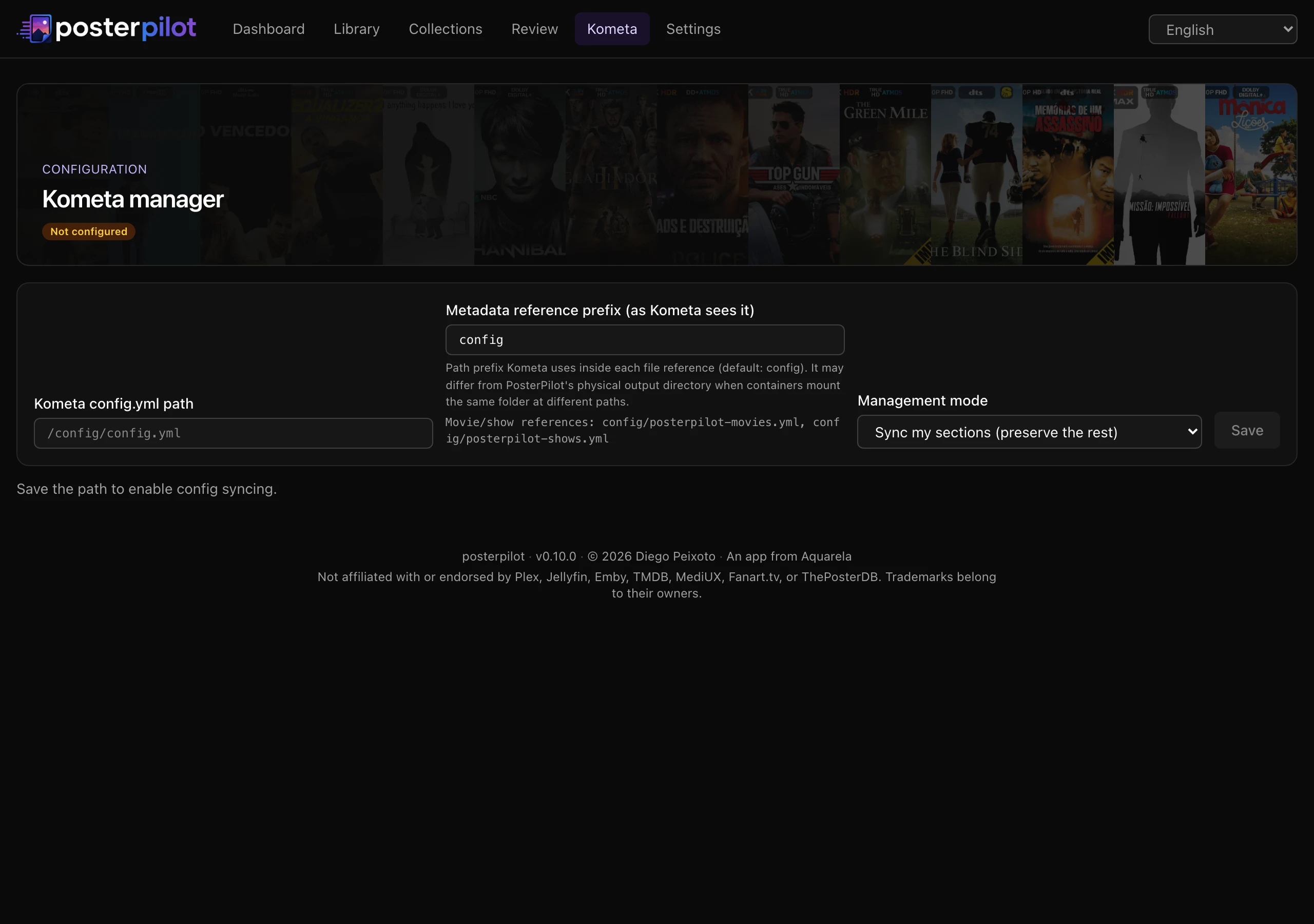
That export is a metadata file. PosterPilot can also surgically manage Kometa’s
own config.yml — every service connector, per-library collections, overlays
and operations, global settings and webhooks, plus a raw editor for anything else
— and wire the matching typed metadata file into each library. Physical output
paths and Kometa-visible file: references are separate; configure the latter
with KOMETA_METADATA_PATH_PREFIX. This lives on its own
Kometa manager page.
Language
Section titled “Language”The UI language is resolved per request: (1) the preferred-language setting when
it names a supported locale, then (2) the request’s Accept-Language header, then
(3) English. Set a preferred language with APP_LANGUAGE, via the Settings page, or
with the header language switcher. Supported locales are English (en), Spanish
(es), Simplified Chinese (zh), Japanese (ja), Brazilian Portuguese
(pt-BR), and French (fr). An unset or unsupported value falls through to Accept-Language, then
English — never an error and never a raw key.
Logging and activity log
Section titled “Logging and activity log”Every operational event is recorded three ways: mirrored to the container
console, inserted as a row in the in-app Activity log (Settings → Activity),
and appended to a rotating log file. The file is posterpilot.log inside
LOG_DIR (default /data/logs in Docker); when it grows past ~5 MB it rotates
(posterpilot.log → .1 → .2 …), keeping about five files. Because the
default lives under /data, the existing /data volume already persists it — no
extra mount is required.
The Activity log table is capped at EVENT_RETENTION rows (default 2000);
older rows are pruned automatically. You can wipe the table at any time with the
Clear activity button on the Activity tab (this does not delete the on-disk
log file).
Environment-variable reference
Section titled “Environment-variable reference”Every setting below can be supplied as an environment variable. Most are also editable in the Settings page; when set via the environment they take precedence and are locked in the UI.
| Variable | Setting | Default | Meaning |
|---|---|---|---|
SERVER_TYPE |
Server type | plex |
Active media server: plex, jellyfin, or emby. |
PLEX_URL |
Plex URL | — | Plex base URL, e.g. http://192.168.1.10:32400. |
PLEX_TOKEN |
Plex token (secret) | — | Your X-Plex-Token. |
PLEX_CLIENT_ID |
Plex client id | generated | Stable per-install identifier sent to plex.tv for PIN login / discovery. |
JELLYFIN_URL |
Jellyfin URL | — | Jellyfin base URL (when SERVER_TYPE=jellyfin). |
JELLYFIN_API_KEY |
Jellyfin API key (secret) | — | Jellyfin API key. |
EMBY_URL |
Emby URL | — | Emby base URL (when SERVER_TYPE=emby). |
EMBY_API_KEY |
Emby API key (secret) | — | Emby API key. |
TMDB_KEY |
TMDB key (secret) | — | TMDB v3 API key or v4 bearer/JWT (auto-detected). |
KOMETA_ASSETS_DIR |
Kometa assets dir | ./data/kometa (/kometa in Docker) |
Directory the exported Kometa YAML is written to. |
KOMETA_CONFIG_PATH |
Kometa config path | — | Path to Kometa’s own config.yml to manage. Empty/unset = Kometa manager off. |
KOMETA_CONFIG_MODE |
Kometa config mode | merge |
merge (surgical — preserves your other keys and comments) or own (regenerate the whole file). |
KOMETA_SERVER_INSTANCE_ID |
Kometa Plex binding | legacy-default |
Exact named Plex instance used by every Kometa preview/write; non-Plex bindings are rejected. |
KOMETA_METADATA_PATH_PREFIX |
Kometa metadata reference prefix | config |
Relative directory visible to Kometa at runtime; . uses bare filenames. |
DEFAULT_APPLY_METHOD |
Default apply method | both |
Default apply method: plex, kometa, or both. |
INCLUDED_SECTIONS |
Included sections | all movie/show | Library section keys to sync; comma-separated (env) or a JSON array (persisted). Empty = all. |
PROVIDER_MEDIUX |
MediUX provider | on | Enable the MediUX provider. |
PROVIDER_TMDB |
TMDB provider | on | Enable the TMDB-artwork provider. |
PROVIDER_FANART |
Fanart.tv provider | off | Enable the Fanart.tv provider (requires FANART_KEY). |
PROVIDER_THEPOSTERDB |
ThePosterDB provider | off | Enable the ThePosterDB provider. |
FANART_KEY |
Fanart.tv key (secret) | — | Fanart.tv API key (the only keyed provider). |
THEPOSTERDB_USERNAME |
ThePosterDB username | — | Optional ThePosterDB account username or email for signed-in scraping. |
THEPOSTERDB_PASSWORD |
ThePosterDB password (secret) | — | Password for the optional ThePosterDB account (encrypted at rest). |
TMDB_ARTWORK_LANGUAGE |
TMDB artwork language | any |
Which TMDB artwork to browse and auto-select: any, ui (follow the UI language), or an ISO 639-1 base code such as en. Invalid values fall back to any. |
MEDIUX_REQUEST_DELAY_MS |
MediUX request delay | 2000 |
Delay between MediUX requests, in milliseconds (throttling). |
MEDIUX_CONCURRENCY |
MediUX concurrency | 5 |
Max concurrent MediUX requests. |
HTTP_CACHE_TTL_DAYS |
HTTP cache TTL | 7 |
How long cached HTTP responses (scrapes) are reused, in days. |
APPLY_CONCURRENCY |
Apply concurrency | 4 |
How many items a bulk apply processes concurrently. |
SUGGEST_PRESELECT |
Suggested artwork | on | Compute and label top-scored candidates; accepting/staging remains explicit. |
INCREMENTAL_SYNC |
Incremental sync | on | Skip unchanged items on repeat syncs (a full rescan stays available). |
LIBRARY_DEFAULT_SORT |
Library default sort | title |
Sort the library wall opens with: title, year, rating, runtime, recent, or added. |
FUN_ENABLED |
FUN section | off | Show the picker, Poster Match, ambient gallery, and session planner. |
THUMB_CACHE_TTL_DAYS |
Thumbnail cache TTL | 30 |
Days a cached provider preview image stays fresh before it is re-fetched. |
THUMB_CACHE_MAX_MB |
Thumbnail cache size | 512 |
Max on-disk size of the thumbnail cache (MB) before least-recently-used eviction. |
AUTH_MODE |
Security → mode | disabled |
Authentication mode: disabled, local, or enabled. Overrides the UI and locks the control. |
ADDRESS_HEADER |
— | — | Header carrying the real client IP behind a proxy (e.g. x-forwarded-for) for local mode. |
XFF_DEPTH |
— | — | Number of trusted proxies in front of the app (adapter-node), paired with ADDRESS_HEADER. |
MAX_UPLOAD_MB |
— | 15 |
Max size of a custom-poster upload, in MB (rejected with 413 above it). |
APP_LANGUAGE |
Language | — (auto) | Preferred UI locale: en, es, zh, ja, pt-BR, or fr. |
LOG_DIR |
— | /data/logs (Docker) |
Folder for the rotating posterpilot.log file (~5 MB × 5 files). |
EVENT_RETENTION |
— | 2000 |
Max number of activity-log rows kept in the database (older rows are pruned). |
DATABASE_URL |
— | file:/data/posterpilot.db (Docker) |
libsql file URL for the SQLite database. |
PORT |
— | 3000 |
Listen port. |
APP_SECRET |
— | — (auto key) | Derives the at-rest encryption key (scrypt); overrides the generated data/.app-key. |
APP_KEY_FILE |
— | ./data/.app-key |
Path to the auto-generated instance encryption key file (used when APP_SECRET is unset). |
Boolean flags accept 1 / true / on / yes (case-insensitive) for enabled;
anything else (or unset) leaves the documented default.
PosterPilot is an independent project, not affiliated with or endorsed by Plex, Jellyfin, Emby, MediUX, Fanart.tv, TMDB, ThePosterDB, or Kometa. Trademarks belong to their respective owners. This product uses the TMDB API but is not endorsed or certified by TMDB.