

FUN experiments and collections
FUN and Collections reuse your synchronized library. Neither area invents media identity, and neither applies artwork just because it found a result or visual family.
Enable FUN
Section titled “Enable FUN”Set FUN_ENABLED=true or enable FUN in Settings. When disabled, the navigation
entry is hidden and /fun routes return not found.
All FUN filters are scoped to the active named server. An exact eligible count is shown before drawing; invalid year, runtime, or rating ranges must be fixed rather than silently broadened.
Night picker
Section titled “Night picker”The picker returns up to three distinct choices from the eligible pool. Filter by library, media type, genre, year, watched state, runtime, minimum rating, recency, or a preset. A draw stores its seed, normalized filters, and selected IDs in the URL, so refresh, Back, and sharing reproduce the same order while those items still exist.
Re-roll keeps the filters and uses a new seed. PosterPilot avoids the bounded recent session history when enough alternatives exist; with a small pool it relaxes only repeat avoidance, never your filters. Blind mode hides identity until reveal, and capsules expose their eligibility rule before drawing.
Poster Match
Section titled “Poster Match”Poster Match requires one title with at least two available poster candidates. Pick between two images at a time until a finite bracket has one winner. Broken candidates are removed from the current match when possible. The winner keeps its provider provenance and is staged on the item; use the normal preview and confirmation to apply it.
Ambient gallery
Section titled “Ambient gallery”The full-screen gallery can show posters, backgrounds, or both, with library and
media-type filters. Use previous/next, pause/resume, interval, and exit controls;
keyboard equivalents remain available. With prefers-reduced-motion: reduce,
automatic playback starts paused until you explicitly resume it for that session.
Images that fail to load are skipped for the session.
Session planner
Section titled “Session planner”Choose two or three movies and a duration budget. The planner uses distinct movies with known positive runtimes, honors library/genre/watched/rating filters, and never returns a plan over budget. Plan again keeps the constraints and changes the seed. If no combination fits, change the budget or filters.
Collections and franchises
Section titled “Collections and franchises”Collections are server-scoped workspaces built from native provider membership and
TMDB belongs_to_collection identities. Same-named collections on different servers
remain separate, and title similarity alone never creates membership.
The collection index includes groups with at least two local members. Detail shows:
- native/TMDB provenance and unavailable TMDB members as context;
- current and staged poster/background state per local member;
- known provider, set, author, language, or design-family evidence;
- explainable consistency and coverage, with unknown provenance kept distinct from deliberate mismatch.
Re-search a whole collection
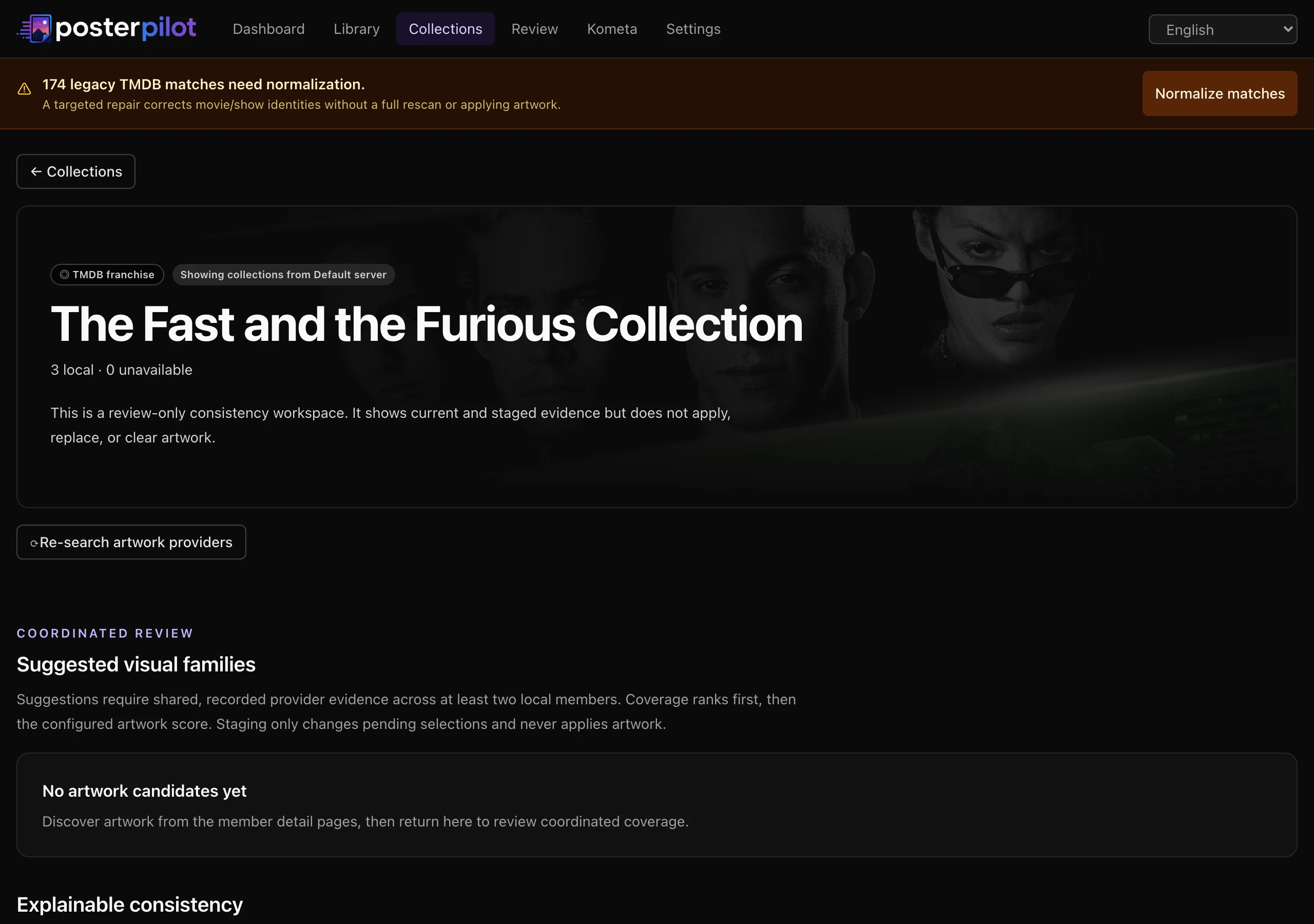
Section titled “Re-search a whole collection”The collection detail page has a Re-search artwork providers action (⟳) that re-runs discovery for every local member in one pass, bypassing the HTTP scrape cache for each member’s provider lookups. Members are processed independently — one failure never stops the rest — and the result reports the outcome as a count (“3 of 5 members re-searched.”).
When ThePosterDB is enabled, the same pass also looks for a matching ThePosterDB
collection set: PosterPilot searches the site’s collection listings for the
collection by name, tries up to six contributor sets, matches each set’s posters
to your local members (exact title first, then token containment, then release
year), and keeps the set that covers the most members. That winning set’s artwork
is injected as one coordinated design across the matched members, so the
family suggestions below can offer it like any other verifiable evidence. Unlike
the per-member pass, this set lookup can still reuse HTTP-cached pages until
they expire (HTTP_CACHE_TTL_DAYS), so a set updated on the site moments ago
may take a cache cycle to show up. Re-search only stores candidates — as
everywhere else, nothing is applied without a preview and confirmation.
Coordinated suggestions and overrides
Section titled “Coordinated suggestions and overrides”When verifiable family evidence spans multiple members, PosterPilot ranks families by coverage and artwork score. A suggestion shows covered and uncovered members and slots. Staging it changes only covered slots. You can override or clear each member and slot independently.
If no common evidence exists, the page offers per-member candidates without claiming a coordinated set. Stale provider candidates are labelled.
Apply and undo collections
Section titled “Apply and undo collections”Collection staging is still ordinary item staging. Use an exact collection preview before confirming any coordinated write: the plan freezes membership, member IDs, slots, destinations, selections, current state, and skips. A membership or selection change invalidates it. Results remain per member and destination, so independent successes are not hidden by one failure.
A collection action can be undone only through its matching revision group and a fresh undo preview. Individual member revisions can also be handled from item history. If the current UI does not expose a coordinated action for a capability, open the member item and use its standard Review/apply/undo controls; do not assume that staging wrote anything.
See Safety, verification, and undo before applying, and Usage for Review and job details.
PosterPilot is an independent project, not affiliated with or endorsed by Plex, Jellyfin, Emby, MediUX, Fanart.tv, TMDB, ThePosterDB, or Kometa. Trademarks belong to their respective owners. This product uses the TMDB API but is not endorsed or certified by TMDB.